How to reset Kwikset door lock? For Kwikset 909, 910, 911, 912, 913, 914, 915. 916, 919 Aura/Halo WIFI keypad/Halo touchscreen WIFI factory reset
1. Make sure the door is open and unlocked.
Step 1: Remove the battery pack.
Step 2: Press and HOLD the Program button while reinserting the battery pack. Hold the button for 30 seconds until the lock beeps and the status LED flashes red.
Step 3: Please note: In this step, there is some difference in different models:
- For Kwikset 909 and 911 factory reset: Press the Program button once more. When the LED flashes green, and you hear one beep, the lock has been reset. Perform the door-handing process to teach the lock the door’s orientation, and add user codes to your lock.
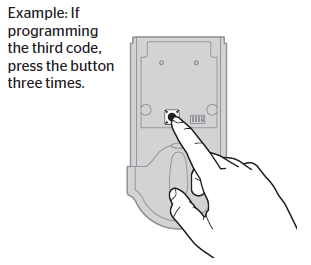
Program button
- For Kwikset 910 and 914 factory reset: Perform the door handing process again to teach the lock the orientation of the door, pair the lock with your intelligent home system, and add user codes to your lock.
- For Kwikset 912 reset: Perform the inclusion process again to add the lock back into your network and controller.
- For Kwikset 913 factory reset: Perform the door handing process again to teach the lock the orientation of the door, and add user codes to your lock.
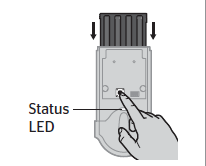
Kwikset keypad door lock status LED.
- For Kwikset 915,916 and 919 factory reset: Press the Program button once more. The status LED will flash and read several times. After a few seconds, the lock will initiate the door-handling process, and the latch bolt will extend and retract to lean the door’s orientation.
- For Kwikset Aura/Halo/Halo factory reset, press the “Program” button. The LED will flash green and red, and the auto-handing process will begin. The latch will retract and extend to learn the orientation of the door. The LED will flash green if auto-handing is successful or red if auto-handing is unsuccessful.
https://www.acslocks.com/