How to reset a Kwikset keypad door lock?
The Kwikset has many different models of keypad door locks. To make resetting the Kwikset keypad door lock easier, we have integrated some models with the same reset process for your understanding. The following are the specific model reset steps:
Please note:
- This Kwikset keypad door lock procedure will delete all user codes associated with the lock, and the default Programming Code (0-0-0-0) and User Code (1-2-3-4) will be restored.
- Delete access codes and event history from the lock.
- If you use a Kwikset intelligent keypad door lock, factory reset all wifi settings, Bluetooth pairings, and user code will be deleted.
- Remove the lock from your Premis app and HomeKit system.
- Remove all users, schedules, and user codes added to the app.
- Remove all user codes that were programmed directly at the lock.
- Disable Auto-Lock.
How to reset the Kwikset lock code without key? For Kwikset 264 and Kwikset 275 reset
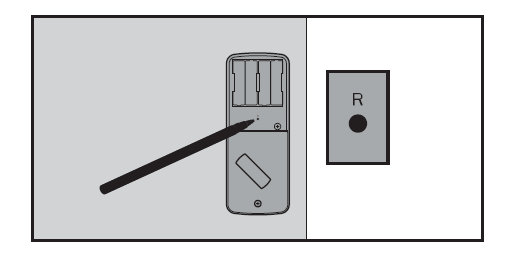
- Please ensure the door is open and unlocked before resetting the Kwikset keypad door lock. Then press and hold the reset button for 5 seconds until you hear three long beeps.
- Enter the default Programming Code (O-O-O-0).
- Press the Kwikset button(Kwikset 264)or Enter Button(Kwikset 275). You will hear one beep.
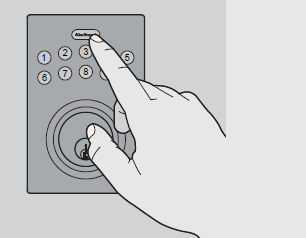
Kwikset 264 button
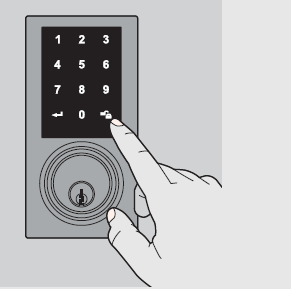
Enter Button(Kwikset 275)
- Press 0.
- Press the Kwikset button(Enter Button). The latch bolt will extend and retract to learn the door’s orientation. If successful, the Kwikset button(Enter Button) will flash green, and you will hear two beeps(only two beeps for Kwikset 275). If unsuccessful, the Kwikset button(Enter Button) will flash red, and you will hear three beeps(only three beeps for Kwikset 275), make sure the door is open and unlocked and that you are using a fresh set of batteries.
- Test the Lock: Activate the screen(Kwikset 275 need); press the Kwikset button with the door open and unlocked (Lock symbol). Make sure it locks the door;
- Test the default User Code: Activate the screen. Touch the random digits that appear(Kwikset 275 need), Enter the default User Code (1-2-3-4), then press the Kwikset button. Make sure it unlocks the door:
Note: The default Programming Code is 0-0-0-0. It is recommended that you change it to a code of your own. The lock is pre-programmed with a default User Code of 1-2-3-4. It is recommended that you delete this code.
https://www.acslocks.com/